Live Switching
Cuts, fades, preview/program workflow, tally, source health monitoring, and web remote.
Preview and program
LiveWing uses the standard broadcast two-bus model. At any moment, one source is on Program (on air) and one is on Preview (queued next). The previous program source automatically becomes the new preview after every cut or fade, so you can immediately set up the next shot.
Click any source tile to put it on preview. Press CUT or FADE to take it to program.
Transitions
CUT — an immediate, hard switch with zero latency and zero GPU work. The output reads from a different frame slot on the exact next frame. No compositing happens; the audio engine absorbs the change within roughly one render buffer (~5 ms at the default 256-sample buffer size).
FADE — a dissolve from the current program to preview over a configurable duration (default 1.0 second). The fade animates transitionAlpha from 0 to 1 at 60 fps. The Metal renderer reads that alpha on each draw call and blends both sources. When the fade completes, the cut is committed atomically — the same final state as a hard cut. A second FADE request while a dissolve is in progress is silently ignored.
Stingers — HTML5 animated transitions that play over the switch. LiveWing has four global stinger slots, each pointing to an HTML file. The stinger animation plays over program, and the source switch happens at the frame the HTML page posts a cutPoint message back to LiveWing. See Overlays for stinger slot setup.
Cutting directly to a source
You can cut any source directly to program without staging it on preview first. The source that was on program moves to preview as a result. If the requested source is already on program, the command is a no-op.
Tally
Every source tile shows its current tally state:
- Red border — on program (live)
- Green border — on preview (next)
- No border — idle
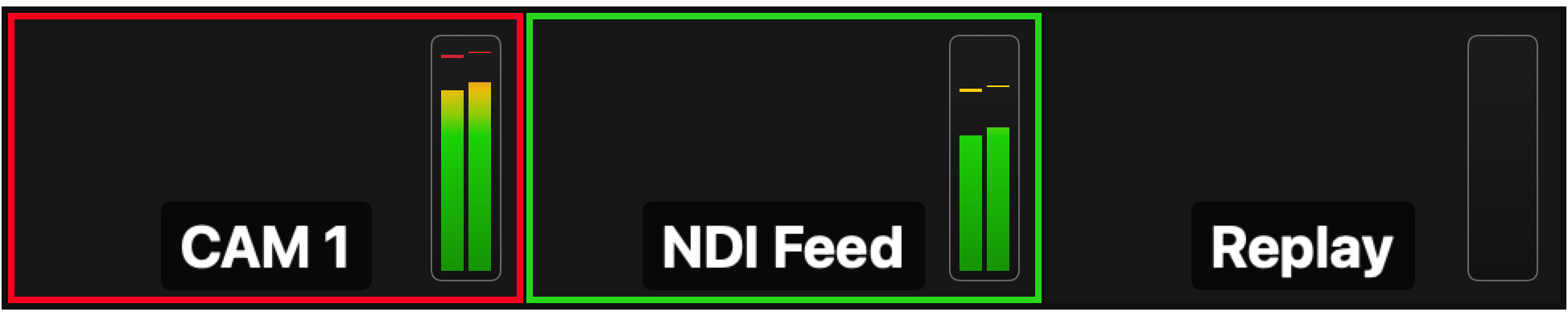
Tally state is broadcast via the WebSocket API in real time, so Stream Deck buttons, hardware tally lights, and any connected client can mirror it.
Source health monitoring
The switcher checks every 500 ms whether each source is delivering frames. Frames older than 100 ms are marked stale. Frames older than 30 seconds are cleared from memory and the source is marked disconnected.
| State | Meaning |
|---|---|
| Live | Frames arriving within the last 100 ms |
| Stale | No new frame for more than 100 ms |
| Disconnected | No frame ever received, or cleared after 30 s |
File and image sources are always treated as live — they do not have a real-time capture cadence and are never considered stale.
If the source currently on program is removed or goes disconnected, the switcher automatically falls back to the next available source that has a live frame.
API control
The WebSocket API (port 8099) exposes the full switching surface:
switcher.cut— swap program and previewswitcher.cutToSource— cut directly to a specific source by angle IDswitcher.setPreview— change preview without taking it to programswitcher.fade— dissolve with a specified duration in secondsswitcher.getState— current program and preview source IDs
The API also broadcasts a state update event whenever program or preview changes, so connected hardware controllers stay in sync in real time. See the API Reference for the full command set.